
Website Protection: Service Settings
Once protection is connected, you can tailor it to your site: enable HTTPS, choose an SSL certificate, and manage caching and HTTP headers.
How to open the settings
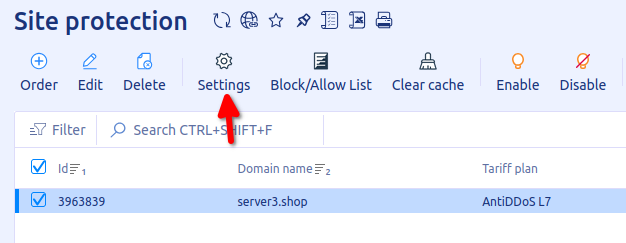
- Log in to your client area, open “Product/Services” in the left menu and click “Site protection”.
- Select your service and click “Settings” on the toolbar.
Security
- Redirect
HTTP→HTTPS. When enabled, allhttp://requests are redirected tohttps://. - Connection type “filter server ↔ web server”. Defines how the filter server proxies requests to your origin server: always over HTTP, always over HTTPS, or keeping the protocol of the incoming request.
- HTTP Strict Transport Security (HSTS). Adds the
Strict-Transport-Securityheader to responses. A browser that receives it always opens the site over HTTPS, even if a link explicitly points to HTTP. - Ban Tor requests. When enabled, your domain cannot be accessed from the Tor network.
- SSL certificate type. Sets the certificate for your domain. Two options are available:
- Let’s Encrypt, a free certificate that renews automatically every 90 days;
- Custom SSL, your own certificate. When you select it, fields for the certificate and key contents appear below. Note that after saving they are not stored in the billing system and are not shown when you reopen the settings. Do not edit these fields unless you want to update the certificate.
CDN
- Caching. When enabled, static content is cached in the CDN and your site loads faster. Content requirements are described in “Website Protection: Caching and CDN”.
- Compression level. Speeds up loading with modern compression algorithms. Works only when caching is enabled. Available values:
- Disabled;
- Low (Gzip only);
- Optimal (Gzip/Brotli).
- Heuristic recompression. Further reduces loading time by improving compression efficiency. Works only when caching is enabled.
HTTP headers
- Keep Referer. Stores the original Referer of the request in
document.referrer, which makes website analytics more accurate.
To allow or block specific IP addresses, see “Website Protection: IP Allow and Block Lists”.
Related
All articles
Website Protection: How DDoS Protection Works
Website Protection takes on all of your site’s traffic: requests first pass through a scrubbing server, and only clean ones reach your server. Here is what this gives you and how the filtering works. Why you need Website Protection Your…

Website Protection: How to Order
Website Protection is ordered in the UFO.Hosting client area and is up and running in a few minutes. Below are the steps from ordering to connecting. How to order Website Protection Log in to your client area and follow these…