
Website Protection: IP Allow and Block Lists
IP lists give you flexible control over access to your site: trusted addresses skip the checks, while unwanted ones are blocked right at the filtering server.
Requests from addresses on the allow list are not inspected or blocked, while traffic from the block list is cut off completely by the filtering server.
How to open the lists
- Log in to your client area, open “Product/Services” in the left menu and click “Site protection”.
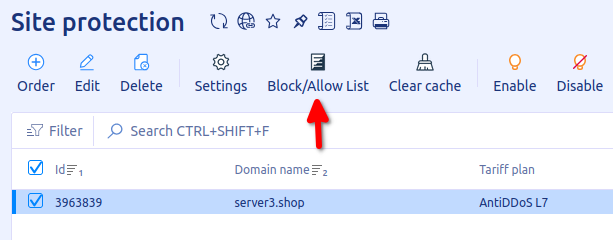
- Select your service and click “Block/Allow List” on the toolbar.
How to add a rule
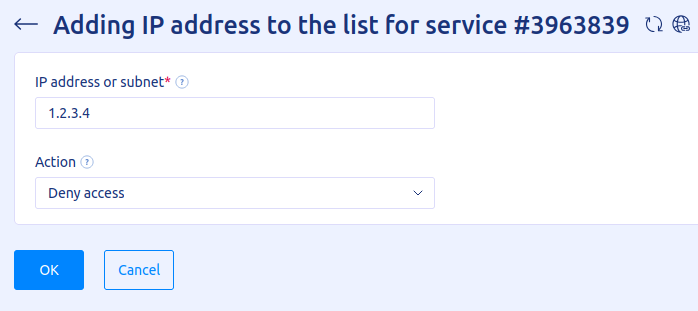
- Click “Add”.
- Enter the
IP addressorsubnetthe rule applies to. Subnets from /32 to /24 are allowed. - Choose an action:
Allow accessorDeny access. - Click “OK”.
How to edit a rule
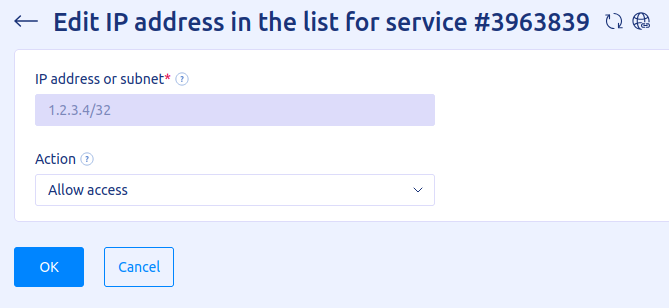
- Select the rule in the list.
- Click “Edit”.
- Choose the action to apply to the IP address or subnet.
How to delete a rule
- Select the rule in the list.
- Click “Delete” and confirm by clicking “OK”.
Related
All articles
Website Protection: How DDoS Protection Works
Website Protection takes on all of your site’s traffic: requests first pass through a scrubbing server, and only clean ones reach your server. Here is what this gives you and how the filtering works. Why you need Website Protection Your…

Website Protection: How to Order
Website Protection is ordered in the UFO.Hosting client area and is up and running in a few minutes. Below are the steps from ordering to connecting. How to order Website Protection Log in to your client area and follow these…