
Website Protection: How to Order
Website Protection is ordered in the UFO.Hosting client area and is up and running in a few minutes. Below are the steps from ordering to connecting.
How to order Website Protection
Log in to your client area and follow these steps:
- In the left menu, open “Product/Services” and click “Site protection”.
- Click “Order” on the toolbar and select “AntiDDoS L7”.
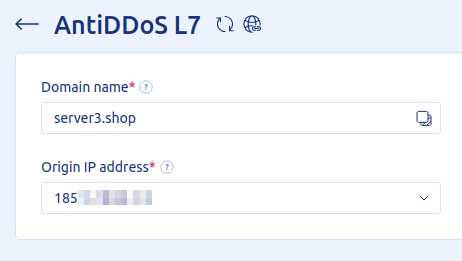
- Enter the domain you want to protect and select the IP address your web server uses for this domain.
- Complete the purchase as usual: choose a payment method and verify your email and phone number.
- Once the payment is confirmed, the service is activated automatically within a few seconds.
- Then connect the protection to your site, as described below.
To route traffic through the protection, change the A record of your domain to the new protected IP address. Do this wherever your DNS records are managed: at your domain registrar or your DNS provider.
All the steps are described in detail in “Website Protection: DNS Settings”.
Related
All articles
Website Protection: How DDoS Protection Works
Website Protection takes on all of your site’s traffic: requests first pass through a scrubbing server, and only clean ones reach your server. Here is what this gives you and how the filtering works. Why you need Website Protection Your…
Website Protection: DNS Settings
Protection starts working once all of your site’s traffic goes through the protected IP address. To make that happen, update your domain’s DNS records. How to set up DNS records Point all incoming traffic to the protected IP address given…