
Website Protection: DNS Settings
Protection starts working once all of your site’s traffic goes through the protected IP address. To make that happen, update your domain’s DNS records.
How to set up DNS records
Point all incoming traffic to the protected IP address given in the instructions you receive after purchasing the service. Malicious requests will then be filtered out before they reach your server.
In your DNS records, replace the server’s IP address with the protected one. Do this at your domain registrar or at the provider whose DNS servers manage the domain’s records.
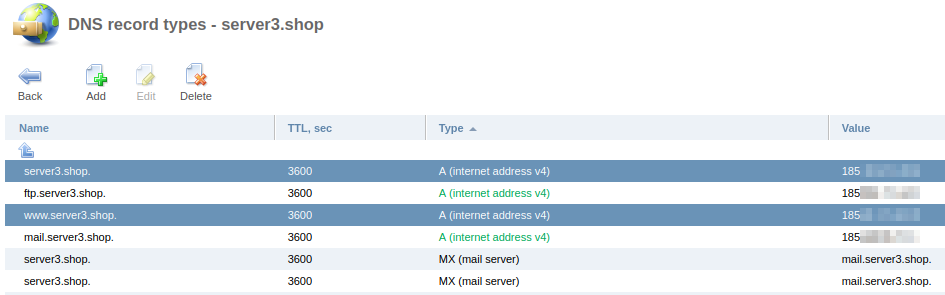
For example, the domain uses ns1.ufo.hosting and ns2.ufo.hosting, and its A records point to the IP address of the server that hosts the site. Replace that address with the protected IP address from the instructions. The addresses in the screenshots are partially hidden.
Before setup:
After setup:
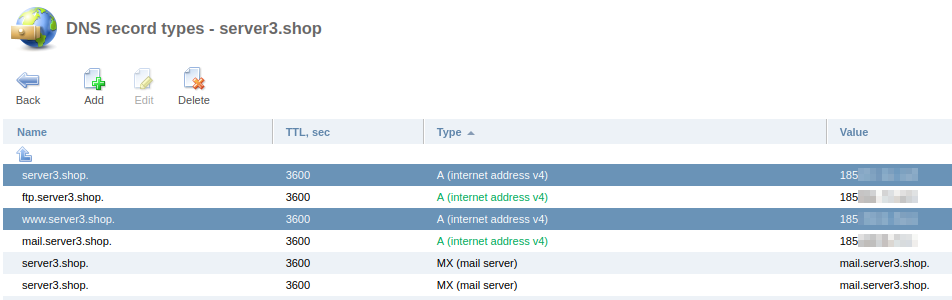
Note: the screenshot still shows the ftp and mail records. They point to the site’s real IP address, not the protected one, and expose it.
To prevent attacks on your site via its origin address:
- Move mail to a separate server that handles mail only. This can be your own mail server or a public mail service that supports your domain.
- If your project does not need mail, it is best to delete the mail records.
- For FTP access, connect to the real IP directly, and preferably delete the public DNS record.
- If your domain has AAAA records (IPv6 addresses), they must be removed: the filtering server does not use IPv6.
Important: DNS updates can take from 2 to 24 hours.
We strongly recommend configuring a firewall on your server that opens ports 80/tcp and 443/tcp only to the scrubbing servers. See “Website Protection: Firewall Settings” for how to do it.
The service options are described in “Website Protection: Service Settings”.
Related
All articles
Website Protection: How DDoS Protection Works
Website Protection takes on all of your site’s traffic: requests first pass through a scrubbing server, and only clean ones reach your server. Here is what this gives you and how the filtering works. Why you need Website Protection Your…
Website Protection: How to Order
Website Protection is ordered in the UFO.Hosting client area and is up and running in a few minutes. Below are the steps from ordering to connecting. How to order Website Protection Log in to your client area and follow these…