
Website Protection: How DDoS Protection Works

Website Protection takes on all of your site’s traffic: requests first pass through a scrubbing server, and only clean ones reach your server. Here is what this gives you and how the filtering works.
Why you need Website Protection
- Your site stays up during an attack. Even if thousands of requests hit it, the traffic scrubbing server takes the blow instead of your server.
- Your server’s real IP stays hidden. Attackers cannot hit the server directly, bypassing the protection.
- Pages load faster. Requests are served by the servers closest to the visitor, just like in a CDN.
- Less load on your server. The proxy server serves cached files itself and handles part of the requests.
How requests are filtered
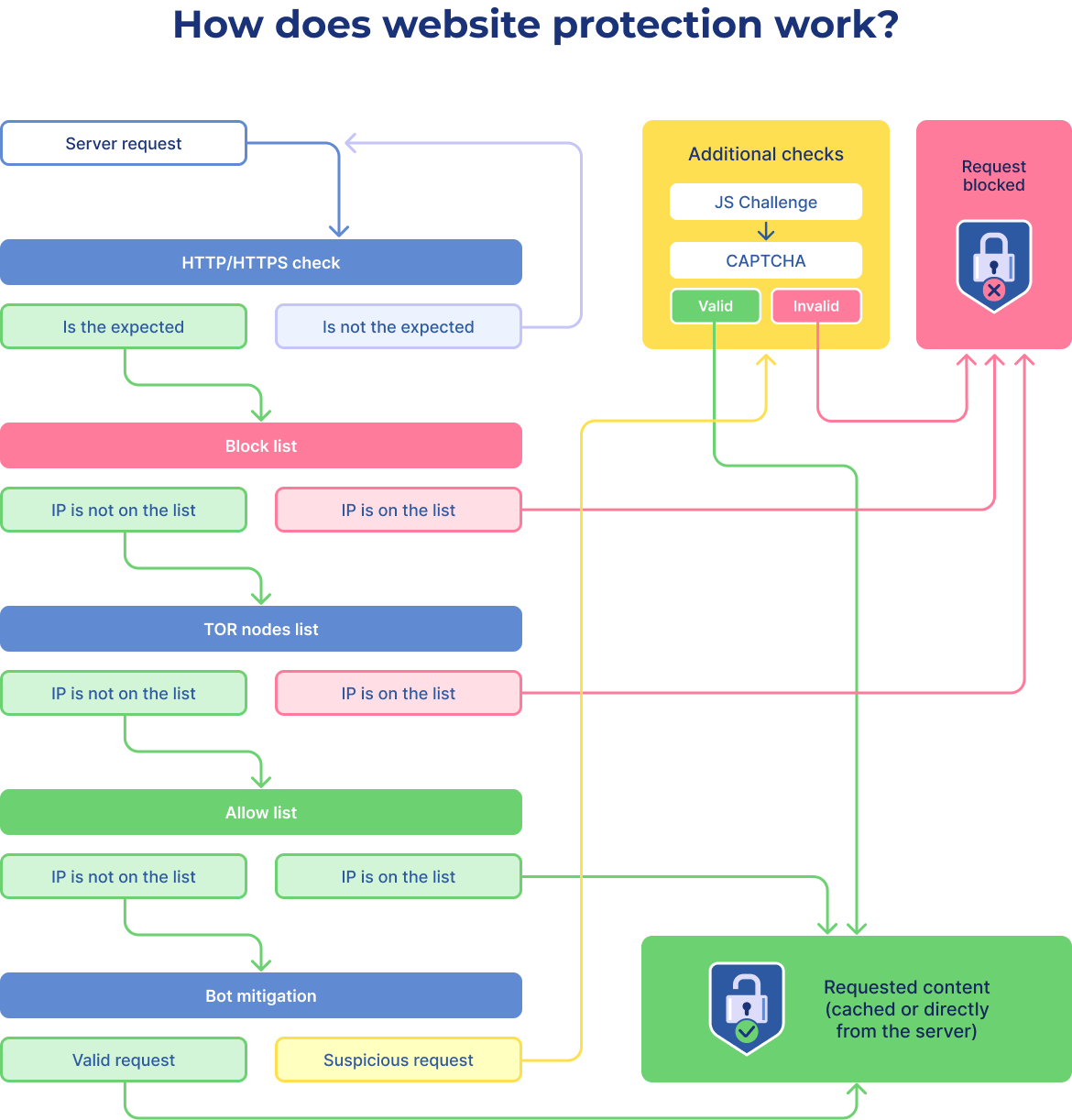
Filtering works at the application layer (L7 of the OSI model): every request passes a series of checks in turn. The main ones are:
- Redirect to HTTPS. If the option is enabled, all requests are switched to a secure connection.
- Block list. Requests from IP addresses on the list are blocked.
- Tor ban. You can block access from the Tor network.
- Allow list. IP addresses you trust bypass the filters.
- Bot mitigation. The system tells real visitors from automated scripts.
- Attack pattern analysis. Suspicious requests get extra checks: JS challenge, CAPTCHA and others.
The diagram shows how a request passes through all the filters:
How to connect the service is covered in the next article, “Website Protection: How to Order”.
Related
All articles
Website Protection: How to Order
Website Protection is ordered in the UFO.Hosting client area and is up and running in a few minutes. Below are the steps from ordering to connecting. How to order Website Protection Log in to your client area and follow these…

Website Protection: DNS Settings
Protection starts working once all of your site’s traffic goes through the protected IP address. To make that happen, update your domain’s DNS records. How to set up DNS records Point all incoming traffic to the protected IP address given…