
Website Protection: Caching and CDN

Website Protection does more than filter traffic: it also speeds up your site by serving static files from a CDN. Here is what gets cached, how long it stays in the cache and how to clear it.
What is a CDN
A CDN, or content delivery network, is a system of servers located in different parts of the world. They cache static elements of your site: images, scripts, styles and other files. When a visitor opens the site, this data is loaded from the nearest CDN node instead of your main server. The site responds faster and performs better.
The CDN is enabled by default for all website protection services. You can manage it, including turning caching on and off, in the general service settings.
Content requirements
Files in the following formats are cached:
.js, .css, .ejs, .png, .jpg, .jpeg, .gif, .ico, .bpm, .svg, .svgz, .cur, .pict, .tif, .tiff, .eps, .ttf, .eot, .otf, .woff, .woff2, .swf, .mp3, .mp4, .ogg, .wav, .webm, .webp, .avi, .flv, .mov, .pls, .midi, .mid, .mkv, .m4v, .ts, .m3u8, .txt, .exe, .zip, .xz, .gz, .lzma, .7z, .rar, .class, .jar, .tar, .doc, .docx, .xls, .xlsx, .ppt, .pptx, .pdf, .rtf, .csv, .ps, .odt, .ods, .odp, .odg.
A server response is cached if:
- the request does not contain the
Authorizationheader; - the requested file has a format from the list above, OR the request contains an
Acceptheader with a static content type (starting withimage,audio,video,text/css,text/font), OR the request contains anIf-Modified-SinceorIf-None-Matchheader; - the response contains a
Last-Modified,ExpiresorCache-Controlheader; - the response contains a
Content-Lengthheader whose value does not exceed 2048 megabytes.
The Accept header must match the regular expression ^(image|audio|video|text/css|font).
The ddg-cache-status response header shows where a file was served from: HIT means the CDN cache, MISS means your server.
Cache time and revalidation
Caching is controlled by the directives of the Cache-Control HTTP header.
How long a file stays in the CDN cache depends on its freshness, which is set in one of the following ways:
- if there is an
s-maxagedirective, the freshness period is taken from its value; - otherwise, the
max-agevalue is used.
If there are no such directives, freshness is estimated heuristically:
- from the difference between
ExpiresandDate(ifDateis later thanExpires, freshness is zero); - without
ExpiresorDate, 10% of the difference betweenDateandLast-Modified; - without
DateorLast-Modified, 5 minutes.
Heuristic freshness always ranges from 5 minutes to 10 days.
A file is revalidated when its lifetime expires. By default, the lifetime equals the freshness, but some directives change it:
min-fresh: revalidate when min-fresh seconds remain before the object’s lifetime ends. This shortens the file’s actual lifetime.max-stale: keep serving the file from the cache for max-stale seconds after its freshness expires. This extends the file’s actual lifetime.
How to clear the cache
- Log in to your client area, open “Product/Services” and click “Site protection”.
- Select your service and click “Clear cache” on the toolbar.
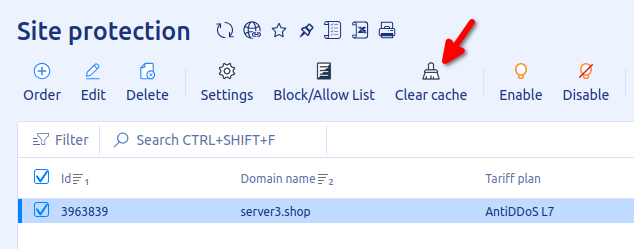
Right after clearing, the site may load slower than usual until the required files are cached again.
Related
All articles
Website Protection: How DDoS Protection Works
Website Protection takes on all of your site’s traffic: requests first pass through a scrubbing server, and only clean ones reach your server. Here is what this gives you and how the filtering works. Why you need Website Protection Your…

Website Protection: How to Order
Website Protection is ordered in the UFO.Hosting client area and is up and running in a few minutes. Below are the steps from ordering to connecting. How to order Website Protection Log in to your client area and follow these…