

WinMTR: A Convenient Tool for Network Diagnostics

MTR is a cross-platform utility for network diagnostics that runs in the terminal. It combines the capabilities of traceroute and ping: like traceroute, it shows the route and all intermediate nodes, but it also calculates in real time the percentage of responses and latency for each hop between your computer and the remote host.
Below, we’ll explain how to use MTR on Windows.
Using MTR on Windows
For Windows, the easiest way to work with MTR is to use WinMTR. The process is straightforward:
- Download the archive and run the program as Administrator.
- If you prefer to see IP addresses instead of hostnames, disable the Resolve names option in the settings.
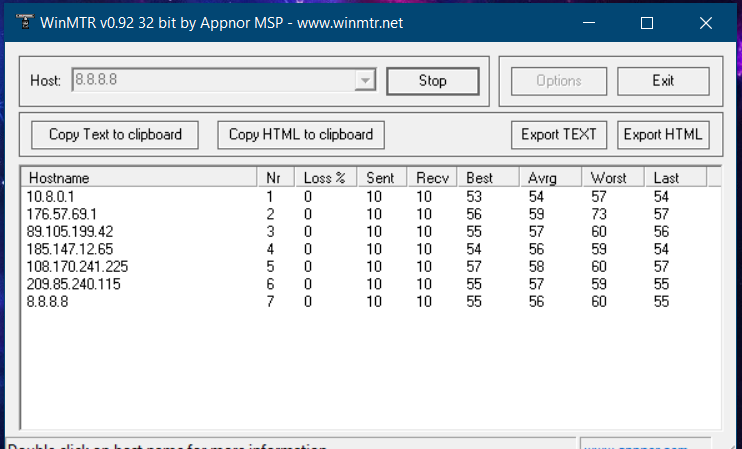
- In the Host field, enter the website domain or server IP address you want to test.
- Click Start to begin the test.
Wait until the Sent counter reaches at least 100. You can stop the test at any time with the Stop button, but the more requests you send, the more accurate the results will be.
When finished, export the report using Export TEXT — this makes it easy to share the results with a specialist.
Key Metrics Explained
- Hostname — the node’s name or its IP address. The message often indicates that ICMP requests are blocked on that node.
- Nr — the hop number in the route.
- Loss% — percentage of lost responses from the host.
- Sent — number of packets sent to the node.
- Recv — number of packets received in reply.
- Best — minimum (fastest) latency.
- Avrg — average latency in milliseconds.
- Worst — maximum (slowest) latency.
- Last — latency of the most recent packet received.
How to Interpret the Results
Focus on consistent issues that appear across multiple destinations. You should pay attention if packet loss reaches around 5% or higher (Loss ≥ 5%), or if the average latency is about 350 ms or more (Avrg ≥ 350).
These metrics help identify where the bottleneck lies — whether it’s with your provider, on a backbone route, or closer to the target server.
Related
All articles
How to Extract Files on Computers and Mobile Devices
Working with archive files is a fairly standard task for any computer user. Apple computers, Windows PCs, iPhones, and Android devices all handle file extraction in a broadly similar way. Still, there are a few differences that can make the…

How to Work with .tar.gz Archives in Linux
As software evolves and data volumes grow, files become larger and heavier. To make them easier to store and transfer, they are often packaged into archives. In Linux, one of the most common formats is still .tar.gz. Despite its popularity,…